VAT records
Organise sales, purchases and VAT records with supporting documents.
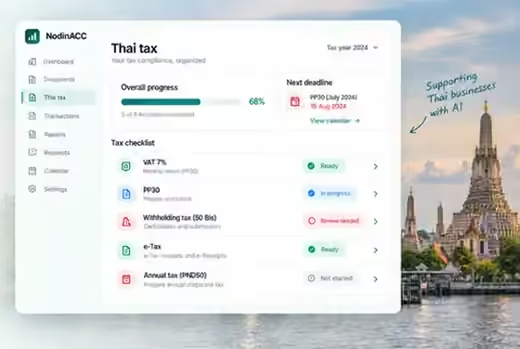
BUILT FOR THAILAND
NodinACC helps you organise the records needed for Thai tax preparation and guides the workflow — from daily transactions to reports and review.
For hotels, restaurants, shops and growing businesses across Thailand.
THAI TAX FEATURES
Keep documents, working papers and review steps together in a clear accounting workspace.
Organise sales, purchases and VAT records with supporting documents.
Prepare monthly VAT working papers with the right information ready for review.
Keep withholding records, certificates and supporting details together.
Organise digital invoices and records. Government submission is a separate process.
Keep review tasks visible and check current official filing deadlines.
Your preparation at a glance · Example
CLEAR. ORGANISED. READY FOR REVIEW.
Keep transactions, supporting records and review steps together, so you can see what’s outstanding when it’s time to prepare your returns.
Example workflow, not a filing schedule. Verify current dates with the Revenue Department.
Official Revenue Department information ↗HOW NODINACC HELPS
Work through your preparation with supporting records and a clear review trail.
Bring transactions, invoices and supporting receipts together.
Prepare records for PP30 and withholding tax review.
Check what is included and which documents support it.
Review the official dates and keep your tasks organised.
FREQUENTLY ASKED QUESTIONS
Common questions about preparing your records. Tax treatment and deadlines should be checked with your accountant.
READY TO GET STARTED?
Start free and see how your AI accountant can support your business.
Start with the setup wizard in your accounting workspace. The public examples do not change your account.
Start with Free accounting. Contact the team when you are ready to add the paid AI edition.
A clear starting point is to keep sales records, purchase invoices, bank statements and relevant certificates together.
Tax treatment and filing dates depend on your circumstances. See the Thai Revenue Department for official information. Prepared records are not evidence that a return has been filed.
Bring the period’s sales and purchase records together, with the relevant tax invoices and supporting details. Reconcile the working papers to your books and review exceptions with your accountant.
This guide does not set a VAT rate or a filing deadline. Confirm the applicable treatment and current requirements in the Revenue Department’s VAT guidance.
Use this as an organisational checklist, not a substitute for professional tax review.
Check the current filing requirements and dates with your accountant and the Revenue Department. Preparing a report in the workspace is not the same as submitting it.
Keep the payment details, payee information, relevant certificates and supporting documents together. Resolve missing or inconsistent details before review.
The applicable withholding treatment depends on the payment and the parties involved. Check the Revenue Department’s provisions on withholding and certificates and consult your accountant rather than applying one rule to every payment.
Organised digital records help your preparation. A stored PDF, a prepared invoice and an officially submitted document are not interchangeable.
Confirm the required format, registration and submission process through the official Revenue Department e-Tax service. This website does not submit documents to that service.
The month tiles on this page illustrate an accounting review workflow. They are not a statutory filing schedule.
Check the current deadline for the relevant return, filing channel and period with the Revenue Department and your accountant. Keep preparation, review and submission as separate tasks.
Start with the correct business account and reporting period. Bring in the statement using the options available in your accounting workspace.
The bank names and connections shown in product illustrations are examples, not a promise that a specific live bank connector is available.
Download an editable HTML template, open it in your browser, replace the sample details and print it. It is a starting layout, not a validated tax invoice.
Check the issuer details, customer information, numbering, required wording, tax treatment and amounts with your accountant before issuing a real document.
Download the template ↓Try the four-stage example on the How it works page: identify missing documents, prepare a request, track responses and review the result.
The tour is interactive, not a recorded video. It uses synthetic example data and sends no requests.
Open the interactive tour →The complete accounting workspace. The paid AI edition adds conversational assistance and automation.
No. The product illustrations and public interactions use examples. Your account remains behind the existing NodinACC sign-in page.
Contact hello@nodin.cloud or sign in to your workspace.
The public website now has separate pages for How it works, Thai tax, Features, Industry packs, Pricing and Resources, based on the approved NodinACC design.
The demonstrations explain the product without accessing your private accounting records. The existing sign-in and accounting application are separate from these public pages.
Use the organisation options available in your accounting workspace to structure your business. Check which company and location a record belongs to before importing or reviewing it.
Ask support to confirm the current multi-company and multi-location options for your account. Public illustrations do not add businesses or change your configuration.
Give each person access appropriate to their role. Review who may view records, edit transactions or approve changes in your accounting workspace.
Only an authorised administrator should change team access. No permissions are changed through this public page.
NodinACC is part of the Nodin platform alongside NodinPMS and NodinPOS. Review the integration options in your workspace before connecting a business system.
Check the company, account mapping and transaction flow, then review the resulting records. The public product diagram does not establish a connection or transfer data.
Keep the supporting document and review context with an accounting entry. When checking changes, review who made them, what changed and whether the change was authorised.
Use the history and audit tools available in your workspace. This public site does not modify or certify your audit records.
Review the backup options and status in your authenticated accounting workspace. Confirm what is included, when it was created and the restoration procedure before relying on a backup.
This public feature card does not create a backup or start a restore. Contact support for the current retention and recovery details.
The walkthroughs, search and industry selector run in your browser using example content. They do not read your accounting records or submit document requests.
Contact and subscription links open your email application so you can review and send your message. Signing in takes you to the existing NodinACC account flow.
For the privacy information applicable to your account and services, contact hello@nodin.cloud.
Free is the accounting workspace. AI is the paid conversational automation edition. Contact the team for the current AI pricing, availability and applicable subscription terms before purchasing.
Public previews use illustrative data. They are not accounting, tax filing or banking confirmations. Ask support for the account terms that apply to your business.
Demonstration only — no supplier receives this message.
To: supplier@example.invalid
Subject: Missing invoice
Dear supplier,
Could you please send the missing invoice for last month? We are preparing our accounting records for review.
Thank you,
Sample Co.